

Bitcoin cold storage means keeping your private keys on a device or medium that never touches the internet, so malware and exchange failures cannot reach your coins. For most people in 2026 that means a hardware wallet, a seed phrase backed up on metal, and a firmware update done before the seed is created.
Everything else is detail. Important detail, though, because the biggest hardware wallet loss of 2026 happened to people who did most things right.
Key takeaways
- A hardware wallet from Trezor, Ledger or Coinkite is the practical default. Trezor’s range starts at $59.
- Back the 12 or 24 seed words up on paper or steel. Never photograph them or store them in a cloud account.
- Update firmware before you generate a seed. A later update does not repair a seed made on flawed firmware.
- For larger amounts, a 2-of-3 multisig across devices from different makers removes any single point of failure.
- Paper wallets with a single printed private key are outdated. Skip them.
What cold storage protects you from
Coins on an exchange are an IOU. If the exchange freezes withdrawals, gets hacked or goes bankrupt, as FTX did in November 2022, you join a queue of creditors. Coins in a phone or desktop wallet are yours, but the keys sit on a device that also runs a browser, email and whatever app you installed last week.
Cold storage cuts that link. The key is created and kept offline, and transactions are signed offline. Only the signed transaction ever reaches the internet.
It does not protect you from losing your backup, from someone who finds your seed words, or from a flaw in the device itself. Those are the risks the rest of this guide is about. If you are still deciding where to buy, our guide to centralized vs decentralized exchanges covers the custody trade-offs.
Cold storage methods compared
| Method | Typical cost | Best for | Main risk |
|---|---|---|---|
| Hardware wallet + written seed | $59 to $250 | Most holders | Lost or exposed seed words |
| Hardware wallet + steel seed backup | Device plus a steel plate | Long-term holdings | Same, but survives fire and flood |
| Air-gapped signer (microSD or QR only) | $219 and up | Users who never want USB contact with a computer | More steps, easier to make mistakes |
| 2-of-3 multisig across makers | Two or three devices | Larger amounts, inheritance planning | Setup complexity, backup of the wallet configuration |
| Paper wallet (single private key) | Free | Not recommended in 2026 | Unsafe generators, awkward spending, fading ink |
A bank safe deposit box is a place to keep a backup, not a storage method. Worth knowing: the FDIC lists “safe deposit boxes or their contents” among the things it does not insure. If you use one, keep only part of your backup there, never the full seed and passphrase together.
Hardware wallets worth considering in 2026
| Wallet | Price (US store) | Screen and input | Notable |
|---|---|---|---|
| Trezor Safe 3 | $59 | 0.96″ mono, two buttons | Cheapest secure-element Trezor |
| Trezor Safe 5 | $129 | 1.54″ color touchscreen | Haptic feedback |
| Trezor Safe 7 | $249 | 2.5″ color touchscreen | Auditable TROPIC01 secure element, Bluetooth, wireless charging |
| Coldcard Mk5 | $219 (list $269) | 1.54″ screen, keypad | Bitcoin-only, air-gapped microSD signing |
| Coldcard Q | $319 (list $369) | Large screen, QWERTY keyboard, QR scanner | Bitcoin-only, runs on AAA batteries |
| Ledger Nano S Plus, Nano X, Nano Gen5, Flex, Stax | Varies by region | Buttons (Nano S Plus, X) or touchscreen | Ledger now markets the Nano S Plus and X as backup signers |
Bitcoin-only devices such as Coldcard carry less code, which some holders prefer for long-term savings. Trezor and Ledger support thousands of coins. If you also hold stablecoins, check network support before you buy. Our USDT wallet guide lists which devices handle which chains.
One older model to avoid buying new: the original Ledger Nano S. It is discontinued and has very little app storage. The Nano S Plus replaced it.
How to set up a hardware wallet safely
- Buy from the maker or an authorized reseller. Not a marketplace listing, not a used device.
- Check the device is genuine. Use the maker’s own app (Trezor Suite, Ledger Wallet) to run its authenticity check.
- Update the firmware first. Then create the seed. This order is the main lesson of the Coldcard incident below.
- Write the seed words by hand, in order, on the card supplied or straight onto a steel plate. No photos, no notes app, no password manager.
- Consider a passphrase. A BIP-39 passphrase adds a 25th word that is never stored on the device. Lose it and the coins are gone, so back it up separately from the seed.
- Send a small test amount, then confirm the receiving address on the device’s own screen, not just on your computer.
- Test recovery before moving everything: wipe the device or use a second one, restore from your backup, and check the same addresses appear.
Backing up the seed phrase
The seed phrase is the wallet. The device is replaceable. Anyone with those 12 or 24 words can take your coins from anywhere in the world.
- Steel beats paper for anything you plan to hold for years. Paper burns, floods and fades.
- Keep two copies in two places. Home plus a trusted relative or a safe deposit box works for many people.
- Do not encrypt and upload the seed. A digital copy turns cold storage back into hot storage, and the encryption password becomes one more thing to lose.
- Split the secrets, not the words. Store the passphrase apart from the seed. Cutting a 24-word list into halves weakens it and is not a substitute for multisig.
Multisig: removing the single point of failure
A multisig wallet needs more than one key to move funds. The common setup is 2-of-3: three keys on three devices, any two of which can sign.
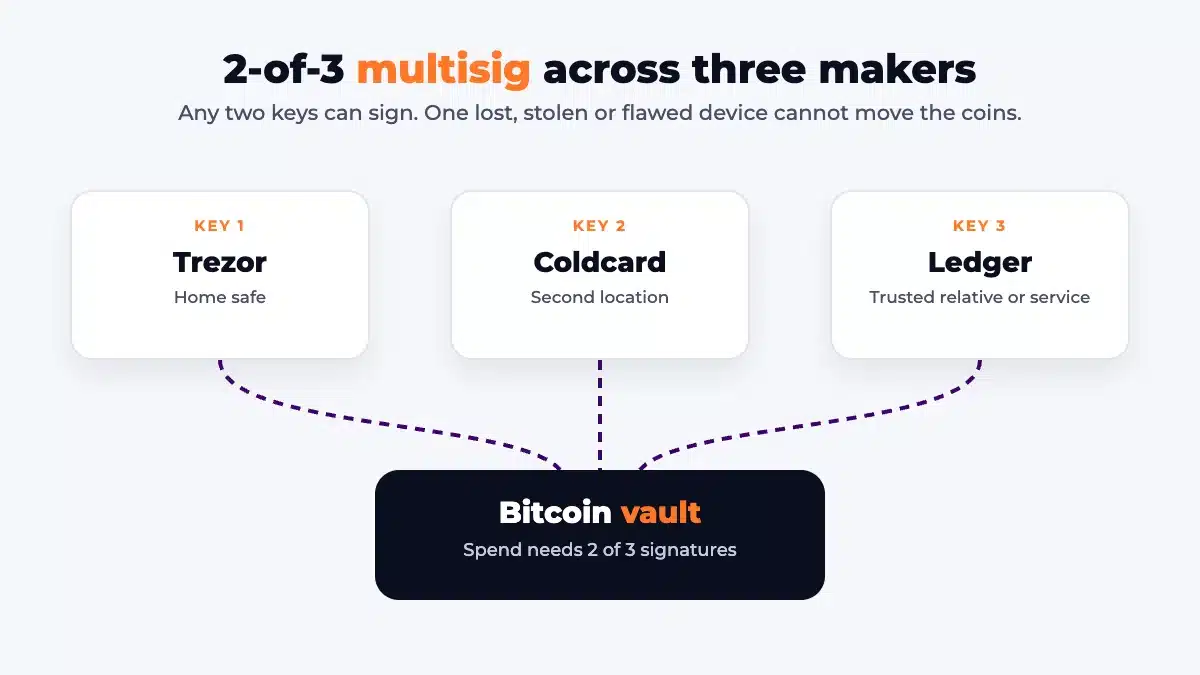
The strongest version uses devices from different makers. If one vendor ships a firmware bug, as Coinkite did in 2026, that key alone cannot spend anything. Free coordinator apps such as Sparrow and Nunchuk handle the setup. Collaborative custody services such as Casa and Unchained hold one of the three keys for you if you want help with recovery.
The trade-off is more to back up. Besides each seed, you need the wallet configuration (the output descriptor or the list of extended public keys). Without it, two seeds are not enough to find your coins easily.
The 2026 Coldcard exploit: why a firmware update does not fix an old seed
In July 2026, attackers began draining bitcoin from wallets created on Coldcard hardware wallets. The devices were not hacked or stolen. A firmware flaw made them skip the hardware random number generator when creating a seed, so the seed could be brute-forced from a computer.
Attacks began on July 30, 2026. Loss estimates run from about $116 million (TRM Labs counts roughly 1,816 BTC from more than 5,200 addresses) to more than $130 million (Halborn). Halborn reports about 40 bits of entropy on Mk2 and Mk3 firmware 4.0.1 to 4.1.9, roughly one trillion combinations, and about 72 bits on Mk4, Mk5 and Q.
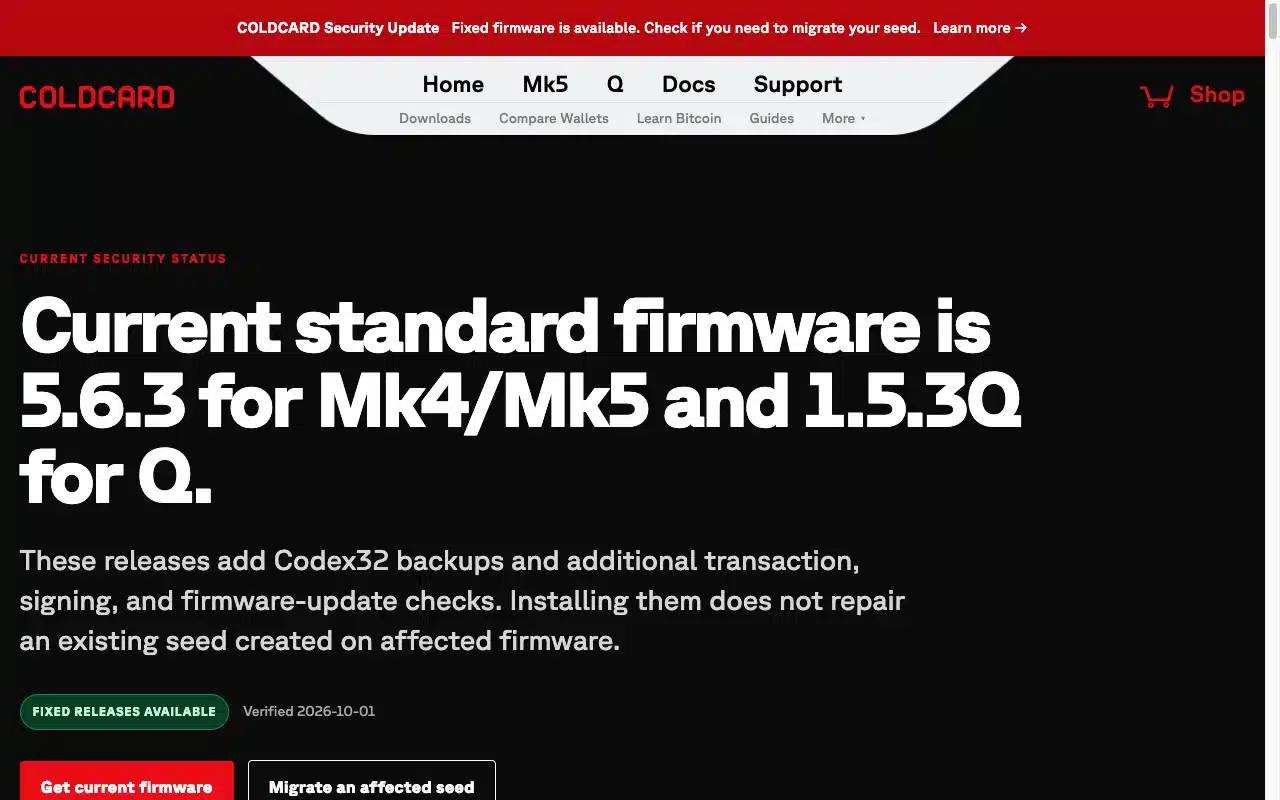
Coinkite is blunt about the key point: updating firmware makes new seeds safe, but a seed already generated on flawed firmware stays weak, and its coins have to be moved.
If you own a Coldcard
- Check the firmware your seed was created on against Coinkite’s security status page. Minimum fixed releases: 4.2.0 on Mk2 and Mk3, 5.6.0 on Mk4 and Mk5, 1.5.0Q on Q (6.6.0X and 6.6.0QX on the Edge track). Current standard releases are 5.6.3 and 1.5.3Q.
- If your seed was made on an affected version, treat it as compromised. Update, verify the signed download, generate a brand-new seed, send a test transaction, then move the rest.
- Coinkite says seeds built from 99 or more independent dice rolls were not affected.
The advisories from Coinkite, TRM Labs and Halborn describe a Coldcard-specific flaw. They do not name Ledger, Trezor or other makers. Halborn also notes Coinkite kept customer records for only 120 days, so many owners could not be contacted. Register your device and follow your maker’s security notices.
Mistakes that cost people their bitcoin
- Typing the seed phrase into a website or app that asked for it. No legitimate wallet support team will ever ask.
- Buying a “pre-configured” device that came with seed words already printed.
- Storing the only backup in the same place as the device.
- Setting a passphrase and not writing it down.
- Never testing recovery until the day it is needed.
- Leaving no instructions for family. Write down what you own and where the backups are, without the secrets themselves.
Cold storage is mostly boring discipline. Buy a reputable device, update it, back the seed up on metal in two places, test the restore, and move to multisig once the amount is large enough that losing it would change your life.
Frequently Asked Questions
What is the safest way to store bitcoin offline?
A hardware wallet with the seed phrase backed up on metal is the safest practical option for most people. For large amounts, a 2-of-3 multisig using devices from different makers removes any single point of failure.
Are paper wallets still safe in 2026?
Not really. Single-key paper wallets depend on a generator you have to trust, are awkward to spend from safely, and degrade over time. A hardware wallet costs as little as $59 and avoids those problems.
Does updating hardware wallet firmware make an old seed safe?
No. The 2026 Coldcard incident showed that a firmware update only protects seeds created afterwards. A seed generated on flawed firmware stays weak, so the coins must be moved to a new seed.
Is a bank safe deposit box a good place for my seed phrase?
It can hold one backup copy, but the FDIC does not insure safe deposit boxes or their contents. Do not keep the seed and the passphrase in the same box.
Which hardware wallet is cheapest?
Among the major makers, the Trezor Safe 3 is $59 on Trezor’s US store as of October 2, 2026. The Safe 5 is $129 and the Safe 7 is $249.
Do I need multisig?
Not for small amounts. It becomes worth the extra setup once losing the coins would seriously hurt you, or when you want an inheritance plan that does not depend on one device or one person.